Showing posts with label tools. Show all posts

Sunday, August 02, 2009

No Posts for 3 months

It's nice to have a break, and get some real life in between posts. Not that I've been having much of a break. The NSW DET blogging tool, of which my classes and I were beta testers is a real winner. Safe, simple blogging for students, classes staff, public or private or groups.


The trick now, once they gloss has faded from the "shiny new toy" is to get some procedures and policies as to what constitutes effective pedagogical use.

So what on the horizon for this edublogger?
  • I launched into twitter with gusto. Fun, and very useful, just like "they" say. Has helped me numerous times.
  • Google docs has finally (yay) been unblocked for staff use at least. Next to push for the unblock for students.
  • I'm running another Intel TEO (Teaching Essentials Online) course beginning the end of this month.
  • More "play" with the blogging tool. Let's see if we can get our scratch creations published and shared huh?
  • All this as well as an active "real life".
Speaking of real life......do you all have multiple twitter accounts (and other social network tools) which separate proffessional from home life, or do you (as does gen y) just mix it all in together.

I'm inclined to mix it all up so far. Maybe its just the old boomers who see the need to separate life into work/play/home. The kids dont seem to care.

All for now. Be back later with more thought, tools, tips, and trick.

Friday, May 01, 2009

intel webinar

An online version of this doc can be viewed and downloaded from Here
The word version of this doc can be downloaded from here. 

Using Google Earth and Google Maps with Blogs/Wikis

Mark Collinson

Mullumbimby Public School

NSW DET


What did students do?

This is a small activity which formed part of a broader multicultural day. Other activities on the day included researching and making traditional costumes, mask making, cooking traditional foods, locating and retelling traditional stories, and learning traditional dance. Guest speakers were invited to cook, tell stories, play music, and dance.

In the library, children were invited to put a pin on the map to show where there “ancestors” originated. The following activity is an extension of that. One that can be shared with a wider audience(e.g. relatives in ancestral home) than those people that walked through the library and saw the wall display.


How does this activity enhance student learning?

By enhancing the “wall map” activity, and being able to share it with a global audience, the children were much more enthusiastic about the activity. The “immersive nature of Google Earth and the ability to zoom in and fly from place to place makes it fun.


Why Use Google Earth in the Classroom?

  • To provide a sense of reality and purpose for learning within the K-12 classroom
  • To engage and excite learners
  • To help learners conceptualize, visualize, share, and communicate information about the world
  • To provide cross-curricular learning options
  • To add a new dimension to learning environments not previously possible
  • To leverage ubiquitous tools for learning 
  • To create active, exploratory, and empowering learning environments
  • To give students opportunities:
    • to exhibit their learning to others
    • to use emerging technologies and digital tools
    • to communicate their research in a personally meaningful way (using Web 2.0 tools)
    • to view their world from a more connected, global perspective
    • to enhance map reading and navigation skills
    • to engage more complex dimensions of human perception

from: http://www.alicechristie.org/gearth/index.html


What syllabus outcomes does the activity address?


From the NSW HSIE change and continuity strand…


The activity meets the aims of HSIE by enhancing the student’s sense of personal, community, national and global identity;


It meets the objectives of HSIE syllabus by:

  • providing knowledge and understanding  ofcultures in Australia and other places, their diversity and similarities and how they influence people’s identities and behaviors.
  • by developing skills in acquiring information, and social and civicparticipation


By studying change and continuity, students should develop historical knowledge and understandings about their heritages and the past, and how these have influenced the present and may influence the future.


The activity fulfils the HSIE foundation Statement Outcome:

Students explain how different cultures and traditions contribute to Australian and community identity. They examine a variety of local and othercommunities, investigating similarities and differences including ways of living, languages and belief systems.


Outcomes and Indicators

CCS2.2

Explains changes in the community andfamily life andevaluates the effects of these on differentindividuals, groupsand environments.

Indicators:

  • listens to life stories of people from different culturalbackgrounds
  • distinguishes between primary and secondary source material when acquiring information
  • uses historical language when referring to source material, e.g. primary source, secondary source, oralhistory, life story
  • identifies the contributions of some significant peopleand events to community heritage.


CUS2.3

Explains how shared customs, practices,symbols, languagesand traditions incommunitiescontribute toAustralian andcommunity identities.


Indicators

• identifies diverse customs, practices and symbols sharedby their local community and all communities withinAustralia

• listens to and retells traditional, religious and ethicalstories that relate to some groups in the Australiancommunity.


Here is an example of what we did.

The students were asked to find their country of origin. Speak to grandpa or grandma. Record a story of why they came to Australia, or what life was like in hometown or even how life is different here.

Then for this session.

1/ Find place on Google Earth.

2/Putplace mark on Google Earth and name it.

3/ Give a quick story 1-2 mins about the place or why ancestors left to come to Australia

4/ (Extension) Email friend or relative the link to the map we publish, and invite comment

http://mullumwriters.blogspot.com/2009/02/where-are-we-from_18.html


.

How is it Done?


A simple (one hopes) 3 stage process. (Oh yeah, you will also need a google account.)


  1. Add place marks on Google Earth.


  1. Import place marks to Google Maps.


  1. Link the maps code to your wiki or blog.


1a) Open Google Earth. Right click on my places and add a folder. Name it (for example) origins.


b) Find your place of origin and click the add place mark. Drag the place mark to your point of interest and name it. Repeat and add more points of origin


c) Make sure all placemarks are in yourorigins” folder. If they are not in there, just drag them in.


d) Right click the “origins folder and Save Place As a kmz file (keyhole markup language…it harkens back to the days of the cold war….read about it on Wikipedia).


2 a)Open Google maps (maps.google.com) and login to your Google account. Click my maps.

b) Create new map, name itorigins, make sure it is a public map, and then save.


c) With the new “origins” map selected, click Edit,


d) Then click import,

e) Choose the KML file that you saved in Google Earth, and then choose “upload from file”.


f) Your Place marks are now on the map.


g) All that is left to do is to get the code and paste it into your blog or wiki. Click “link” and copy the html code ready to paste.


That’s it for the maps part.


Next to embed into your wiki/blog.


3. a) Open your blog, go to new post, and use your blogs specific, “insert html” feature. All blog platforms are slightly different, so you may have to look for the feature.


This e.g. is WordPress (of which Edublogs is a variant).


Paste it in., and update or save your page.


b) That’s it!View your blog/wiki.


Review


  1. Add placemarks on Google Earth.


  1. Import placemarks to Google Maps.


  1. Link the map’s code to your wiki or blog.


As a follow up activity, I would get those children who put a place mark on the map, to email the blog link to a relative or friend and invite them to view and comment.


Further resources

http://www.google.com/educators/p_earth.htmlGoogleearth site for educators

http://www.juicygeography.co.uk/googlecoursework.html 10 ways you can use Google earth with your students


Questions?

Feel free to email me

mark.collinson@det.nsw.edu.au

http://c21skills.blogspot.com


Friday, October 05, 2007

Scratch - Visual Programming Environment - Australian Lesson Exchange


The Australian Lesson Exchange (ALE) is a relatively new wiki for all Australian Educators from all states and territories. Its a place to share your stuff! Fellow Aussie edubloggers may like to check it out!

Richard Wiktorowicz from Moorefield Girls High has kindly shared, via ALE, a fantastic set of activity cards in PDF that he has developed for scratch. Thanks Richard.
Scratch - Visual Programming Environment - Australian Lesson Exchange

Scratch is a new programming language that makes it easy to create
your own interactive stories, animations, games, music, and art -- and
share your creations on the web.

Scratch is designed to help young people (ages 8 and up)
develop 21st century learning skills. As they create Scratch projects,
young people learn important mathematical and computational ideas,
while also gaining a deeper understanding of the process of design.

For those who are yet to discover the joys of scratch take a look at one of my year 5 student's movies here. Cody did the storyboard, the sprites and backgrounds himself, (as well as the scripting of course).


Blogged with Flock

Wednesday, September 26, 2007

Yet another Poll

Thats right, another poll. This time from Vizu.
Hopefully blogger will work more smoothly with this one than the zoho poll, which had a strange cookie problem, anyway....give it a shot and let me know if you have any problems please.

Monday, September 24, 2007

Polls in Classroom..part 2

Well, it would appear that zoho polls is having issues with cookies on some browsers. (Mozilla and Explorer to name just 2). Then again, maybe its a blogger thing?

A lot of the free online poll creators give me rather bad code to play with , so I gave up and tried bloggers' own widget. It works for me, so how about giving it a shot. Its in the bar to the right.

Pity about the cookie issue on the zoho poll. The fantastic thing about zoho is that I can save the results, and create multiple polls, tag them, search them, and post them (kind of).

Use of Polls in classroom

Hi All

Its been a while since I posted. This is just a quick one to test a feature of online polling. Have a go and let me know what you think. There is a lot of interesting pedagogical discussion around the use of polls. I'm just playing at the moment, but can see a use for them in the near future.

Friday, September 07, 2007

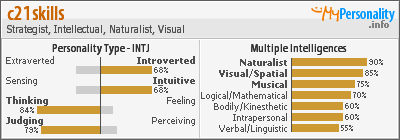
Personality Types and Your Classroom

Thanks to Sue T at "and another thing" (great blog Sue) for pointing me to mypersonality.
At first I was startled at the results, but after my initial surprise, I found I have had plenty to ponder. I'd never seen myself as a strategist before, but upon reflection, thats what I do all the time. I generally sit back, analyse and assess a situation, formulate a plan for action and when the time is right....act. Not everyone does that!

The site gives lots of informative quotes and support, as well as lots of links off site to personality support/information groups.

Sign up and take the tests, then post your widgets.
I can see lots of practical educational applications for this. What personalities are there in your class? How can you modify your teaching learning strategies to enable the others types to succeed? Do you plan for multiple intelligences?

I showed this site to my staff and some where keen to give it a go. Will be interesting to try and develop a group personality for our staff. Might make planning a bit easier.

Click to view my Personality Profile page

Tuesday, July 24, 2007

Briefing the Principals

I've been asked to present to a group of local small school principals regarding computers in schools and staff training.

I've put together a package that I feel provides a framework for understanding the issues surrounding "21st century skills".

To get things started I though I'd shake it up first. Four months old but good, and only 2 minutes. That ought to turn the discussion to getting these skills out to our kids.


So how do we get there?

Nets: the next generation: This is an excellent refinement of digital world skills including the important realm of citizenship skills (which is often overlooked in the discussion). Nets the next generation is presented in an easy to read, checklist style.

Leadership in an Online World: This document from the Ministerial Council on Education, Employment, Training and Youth affairs, (MCEETYA) provides a framework which will enable leaders to plan for and support change. Australia and New Zealand are committed to this. Greg Whitby referenced a similar document in his recent post at blueyonder


School 2.0 map: get a free one here. School 2.0 is a brainstorming tool designed to help schools, districts and communities develop a common education vision for the future and to explore how that vision can be supported by technology.


This inevitably leads to the question: "This is all well and good, but how do I prepare my staff?"
That's easy... The Intel Teach program is excellent here, though some might say that excellent is understating things a bit.
"It is an exemplary professional development opportunity for educators committed to creating learner-centered, technology-enabled curriculum and instruction for the 21st century."
- ISTE* Seal of Alignment Report on
Intel® Teach Essentials Course, Version 10

Intel teach is a global program, and is being implemented in over 50 countries, but for examples of how it's working here in NSW (Australia) check out some examples of intel teach in NSW

Hopefully my presentation will encourage some schools (just one would be enough) to make a change.

So that's it. What have I left out? What do I need to leave out? As always, comments and tips are most welcome.

Wednesday, June 27, 2007

Farewell Mr Benham

Our principal of the past ten years retires in 2 days time after 40 years of service to Public Education.
Here is a small tribute that some of the students, staff and I put together.

The show was created in PowerPoint and was embedded using zoho. With zoho it's as easy as uploading and embedding. Podcasts were recorded using audacity, and are hosted at OurMedia

Nothing quite like a retirement to bring a team together.

Tuesday, June 26, 2007

Cool New T Shirt

When Darren Draper said that he'd left a box of t-shirts at the doorway of the main building on ISTE island, I just had to go inworld as soon as I returned from work and grab one "before someone stole the box". (Daren's words)

Whilst I was expecting to get a t-shirt, I wasn't expecting to meet such a range of friendly folk attending the NECC conference in Atlanta though. Had a wonderful time listening to conference highlights from the participants. sounds exciting, though a bit overwhelming...and there are still 2 more days to go.

I made some great new friends. I'll certainly be visiting more regularly.

I live in a relatively remote part of NSW Australia and Second Life provides me with a real, and achievable way to connect with others.

Thanks Darren.

Tuesday, June 19, 2007

Netvibes trumps Pageflakes!!


In reponse to last nights post on the race to be voted the best reader/aggregator in the webware 100 awards, I learned today that netvibes beat the others in the category. Firefox won best browser, followed by Opera, then IE7, followed by netvibes (not a browser but an aggregator).

If you havent checked out netvibes, then now is probably a great time to do so. If you have ditched netvibes in preference for another reader/aggregator, then I'd love to know why. Let me know why you dont use netvibes.

(Oh and by the way...Google Reader came in at fifth place).

Monday, June 18, 2007

What's your Favourite Web App? Webware100 Awards

Tonight's the night folks!

Webware.com announces the winners of the top 100 webware awards.
What are the best 100 Web 2.0 sites and services?

The categories are:
Browsing, Communications , Community, Data, Entertainment , Media, Mobile, Productivity, Publishing, and Reference.

Of particular interest to me (but by no means the only interest) is the "Browsing" category. Here we have a contest between google reader, bloglines, netvibes, pageflakes and yahoo pipes. It will be interesting to see what the community chooses as their number one. I use netvibes as my homepage, have tried bloglines and google reader, (then went back to netvibes). Have not tried pageflakes though. Netvibes suits me, so why change?

As I type, the winners have not been announced, but it's only moments away. So check out the list, browse through the winners, and let me know what you (or your students) think.

Tuesday, June 12, 2007

Our Wondrous Journey Begins

There has been some great discussion amongst my colleagues over the last few days regarding moving ahead and engaging students with rich tasks, that promote higher thinking skills, in a 21st century context. Darren's video has helped immensely, (thanks Darren). The best part of the discussion has been the creation of a lesson sharing wiki.

On top of this came a presentation that was shown today to a group of ICT leaders in my state. The discussion has begun. It will be interesting to see where we can take it.

Monday, June 11, 2007

Quintura for Kids

Yahooligan used to be a favourite of mine, but has become a real mess lately. (Advertising, junk, too many distractions). It's even been blocked by my Education Department.

Quintura for Kids is a neat looking search engine, and it's kid friendly. Takes a bit of practice (view the demo) but I intend working with this next week with a few of my classes, so will keep you informed as to how it goes.

Unfortunately I couldnt get it to work in flock or firefox. I keep getting a "please wait" message, Internet explorer 7 was fine though. I searched for a solution to this, but found none, so maybe its just me. If you get it to work in mozilla can you let me know?

Thanks to Ben at The Tech Savvy Educator for the pointer.

Saturday, June 09, 2007

Will it all come to a grinding halt?

Three things happened that grabbed my attention this week. They all had a common thread.

First: Jane Nicholls @ *** ICT U Can! posted a clip where she introduced flixn.


Great stuff (again) Jane. Lots of educational and real world application.

Second: A good friend posted me a link to Blaise Aguera demonstrating Photosynth. Amazing stuff, and well worth viewing. My friend said he can't wait until this is everyday life.

Third: I spoke with some colleagues who earlier in the week had successfully trialled an inter school video chat. One beach side school showed off their beach to another beach side school, (1200 km apart) and they both shared their beaches with a school at Broken Hill, (on the fringe of the Great Australian Outback). About 1500 km from both. Check out the map here


So what's this common thread?

Well, as I type this, there is a debate happening in Australia regarding the necessity (or not, sadly) of a roll out of greater broadband services to our nation. (It's an election year in Australia). We currently have some government members stating that there is really no great need for faster internet. This is from the country that has the dubious distinction of having our (ex) Minister for Communications, Information Technology and The Arts, being called the World's biggest Luddite , by the The Register.

Innovators are currently reaping the benefits of a relatively untrafficked network. The unfortunate thing is that as more and more people adopt the technology and put it to productive use, then the network will groan and strain and ultimately fail under the load of the extra traffic. How will your LAN cope? What about your WAN? Is it able to cope with the exaflood?


Readers of this blog are innovators and pioneers in their respective fields. The technologies we are creating, discovering and putting to productive use are mostly dependant upon fast connection speeds and high volume data throughput. As educators our goal is to promote change in thinking. As the following diagram (from Going Virtual: Technology and the Future of Academic Libraries) shows, there can be no change or move towards a 21st century paradigm unless we have a reliable technological base.


What will happen to your local networks when every family in your district/region/state starts using flixen at the same rate as email. What about flixn spam?
Will members of your family be able to simultaneously be involved in an immersive high bandwidth experience like second life? What happens to video chat between schools when every student wants to share, rather than just one teacher?

Is your network (remember, the internet is just a network of networks)going to cope or break?

Tuesday, June 05, 2007

Podcast is Go

Enough testing.
The first podcast on Mullum Writers is published (cast?)

Check out Zac's podcast here.

I thought that my initial post was satisfactory, but I wasnt happy with the visitor having to click a link and then have a new page open with a player, (eg firefox/flock opens a new page and you get to watch the quicktime bar as you listen.) My students and I want visitors to enjoy the artwork and read along as they listen.

When I'm not satisified, then I usually don't rest until I am, so rather than lose sleep tonight wondering how to fix it, I spent some time digging up and applying a great hack that lets you use the word press player within blogger.

Basically you'll need some webspace to store the java code and the flash script. As a blogger user I had a googlepages account. I find that googlepages is great for storing widgets, pics and stuff that I need to reference later.

Paste a script to reference your java and swf files into the head of your blogger template.

Then you paste a script into the post and add the url of your hosted audio file.
The result, I feel, is worth the effort. If anyone has a better solution then I'm all ears.

My next challenge is to setup a "recording studio" in the school that can be utilised during quiet moments. Quentin posted a fantastic site in response to my last post, so I'll be studying up on ways to make the 'casts more enjoyable.

Stay tuned!

Monday, June 04, 2007

Podcast Test No 1

Inspired by Jane Nicholls, and helped by a wonderful tutorial on podcasting for beginners, I present you with my first podcast. Enjoy :-)

Click here to listen to podcast test number 1

Next task, a podcast feed, and of course, some real content.

Update: The player below works so much better than my first attempt at clicking on a link. Has anyone else done this in blogger?

Tuesday, May 29, 2007

Podcast Research - Help Required

This request from Jane

Hi all

I am currently undertaking research looking at the question: In what ways does podcasting enhance oral literacies?I have been gathering data in my own context but I would love to hear what other teachers have found when using podcasting in their classroom programme and add voices from further a field into my final write up.

I am intersted in authenticity: * Audience * Context * Purpose * Self confidence

If you could provide an example of your students demonstrating any of these things I would love to hear about it and incorporate it into my study. Please leave me a comment on my blog including the country that you are commenting from. Please could you include this request on your blogs with a link to this post, I would love to get as much information as possible. It will be great to have a piece of research that says - This is worthwhile doing, and this is why.

Jane

*** ICT U Can!

Monday, May 28, 2007

Time4 Online

Sheryl Nussbaum-Beach has a fantastic keynote presentation at the Time4 Online Conference. Its well worth checking out.

Thanks Sheryl, wonderful keynote. I get the feeling though that you are speaking to the converted.

We (your fellow conference participants) can master the stuff. We can join in online.

But it's many of our colleagues I'm concerned with. The reaction to a presentation like yours (in my experience) is that it divides the audience into those that "get it" and go off and bring their students into the global discussion, and those that find it "scary", which results in a fear of the changes, often leading to a withdrawal. (Machines are unplugged, networks are dismantled, students are disengaged).

It's less scary that way, and a sense of control can be regained.

This situation is sad. It's what I find really scary.

How can this reaction be overcome? At a class/school/region/state or national level?